
Tag: small business

  • When a DIY Website Starts Holding Your Business Back (And How to Know It’s Time to Upgrade)

    When a DIY Website Starts Holding Your Business Back (And How to Know It’s Time to Upgrade)

    4–6 minutes

    A DIY website can only take your business as far as it was built to go. What worked when you started may be what’s holding you back now.

    Many small businesses, nonprofits, and municipalities start with a DIY website for good reasons. It’s affordable, fast to launch, and puts control directly in your hands. For a while, that’s enough.

    But expectations have changed. Websites are no longer just digital brochures. They are expected to load quickly, work flawlessly on mobile devices, integrate with other systems, meet accessibility standards, and support real business goals. As your organization grows, the website that once helped you get started can quietly become a limitation.

    We see this regularly when organizations invest time into marketing, social media, or outreach but hesitate to send people to their own website. The issue is rarely effort. It’s usually that the site was never built to support what the business has become.

    Quick Take

    • DIY websites work best for early-stage or low-demand use
    • Growth changes what a website needs to do
    • Poor usability and performance reduce trust
    • A site can limit progress without visibly “breaking”
    • Even one warning sign is worth reviewing

    At Forward Digital Marketing, we help small businesses make that leap from DIY to done right — ensuring your website performs, converts, and evolves with you.

    When Does a DIY Website Stop Being Enough?

    A DIY website stops being effective when it can no longer support your current traffic, user expectations, or operational needs. If the site is slow, hard to use on mobile, or difficult to update correctly, it becomes a bottleneck. This often happens gradually, which makes it easy to overlook. The key issue isn’t the platform — it’s whether the site was designed for where your organization is now.

    Your DIY Website Was Built for a Different Stage

    Most DIY sites are created to answer a simple need: “We need to be online.”
    They are not usually designed for:

    • Higher traffic volumes
    • Multiple user types with different needs
    • Ongoing content updates
    • Long-term scalability

    As your business matures, the site often stays frozen in its original structure. Navigation becomes cluttered. Pages are added without a clear hierarchy. What once felt manageable becomes fragile and inconsistent.

    Performance and Mobile Experience Matter More Than They Used To

    User expectations have changed, especially on mobile. Slow load times, awkward layouts, and hard-to-tap buttons create friction immediately.

    Common issues we see:

    • Pages loading slowly due to bloated builders or plugins
    • Mobile layouts that technically “work” but are frustrating to use
    • Forms that are difficult to complete on smaller screens

    These issues don’t just affect user experience. They reduce engagement, trust, and search visibility.

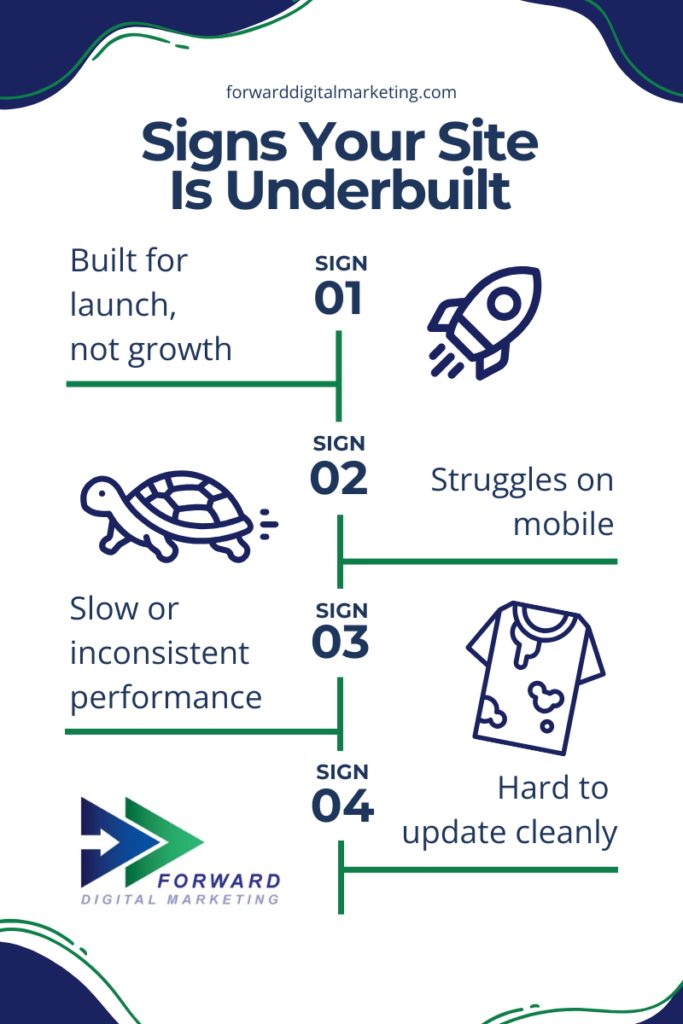
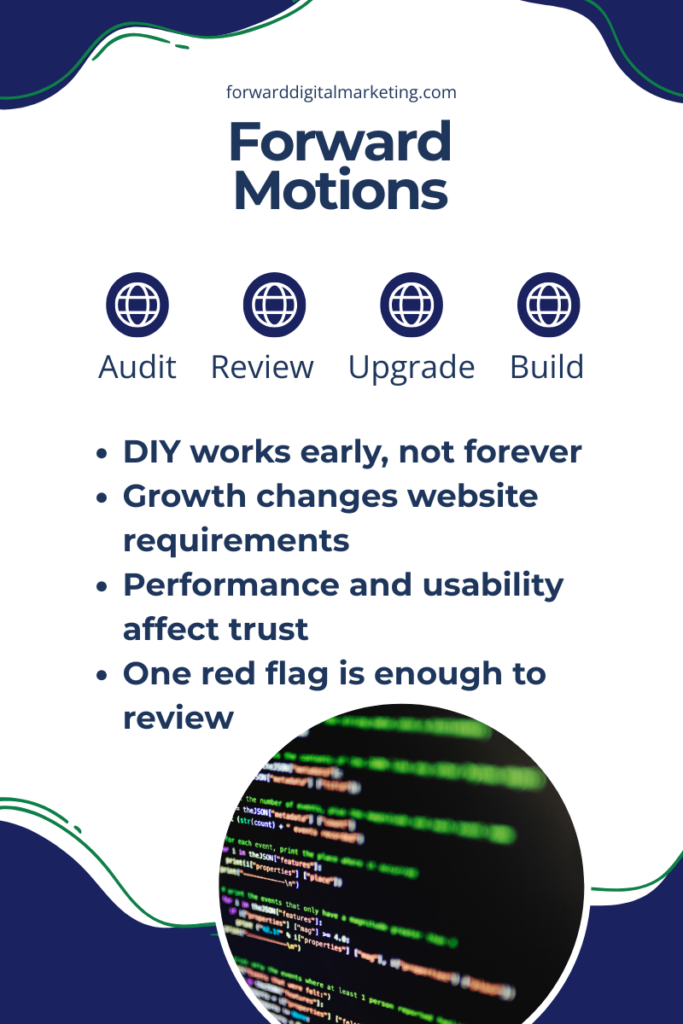
    white flyer with four signs your DIY website is underbuilt

    Your DIY Website No Longer Reflects Your Credibility

    As organizations grow, their brand expectations grow with them. A site that felt acceptable early on may now feel outdated or incomplete.

    This often shows up when:

    • You hesitate to share your website link
    • The design no longer matches your offline professionalism
    • Competitors appear more polished or easier to navigate

    Your website sets expectations before any conversation happens. When it lags behind your real-world capabilities, it creates unnecessary doubt.

    What This Means for Businesses

    A website should support your operations, not quietly work against them. When a site can’t adapt to new goals, new users, or new standards, it limits growth even if everything else is working well.

    Ignoring these signals can lead to:

    • Missed inquiries or service requests
    • Lower trust from first-time visitors
    • Wasted effort in marketing campaigns
    • Increased internal frustration managing updates

    Upgrading doesn’t always mean starting over, but it does mean reassessing structure, performance, and purpose.


    Frequently Asked Questions

    How do I know if my website is actually the problem?
    If traffic, engagement, or conversions have stalled despite other efforts, the website deserves review. Internal hesitation about sharing the site is also a strong signal. Even one clear issue is enough to investigate.

    Is a DIY website bad by default?
    No. DIY sites are useful at the right stage. Problems arise when the business grows but the site does not evolve alongside it.

    Does upgrading mean rebuilding everything from scratch?
    Not always. Sometimes the issue is structure, performance optimization, or accessibility — not the entire platform. A proper review clarifies what actually needs to change.

    What features do growing organizations typically outgrow first?
    Common gaps include mobile usability, forms and integrations, accessibility compliance, and content organization. These needs increase as traffic and expectations grow.

    How often should a website be reviewed?
    At minimum, a structural review every 1–2 years is reasonable. Major changes in services, audience, or traffic should trigger a review sooner.

    What to Do Next (Your Upgrade Path)

    At Forward Digital Marketing, we don’t treat websites as design projects alone. We treat them as systems that should support clarity, operations, and long-term growth. When a site starts to feel limiting, that’s usually a sign it’s time to step back, assess the structure, and align it with where the organization is now and where it’s going next.

    Option A: Improve What You Have

    • Speed optimization
    • Pages reorganized for conversions
    • Professional content refresh

    Option B: Migrate to a More Scalable Platform

    • WordPress benefits: ownership, customization, SEO control
    • Hosting reliability + support

    Option C: Full Redesign

    • Strategic overhaul aligned with growth goals

  • Holiday-Ready Websites: How to Capture More Seasonal Sales (Without Rebuilding Your Site)

    Holiday-Ready Websites: How to Capture More Seasonal Sales (Without Rebuilding Your Site)

    The holiday season moves fast, and online shoppers move even faster. They’re searching for the perfect gift, comparing options, and making snap decisions. The real question is: Will your holiday-ready website convert that urgency into sales or send buyers somewhere else?

    During the holidays, attention spikes, but attention doesn’t pay the bills. Conversions do. This season isn’t just busy: it’s competitive. As shoppers search for the fastest, easiest way to buy or book before the end-of-the-year rush, small businesses that show up with clarity and confidence will win the sale. A website that makes customers wait and wonder? Those are easy to abandon. Here’s how to turn visitors into buyers, bookers, and subscribers before the busy season hits, without a full holiday-ready website redesign.

    In this article, we will:

    • Boost your holiday lead capture while customer intent is at its peak
    • Guide shoppers directly to seasonal offers where they’re most likely to click
    • Remove confusion from your buyers journey with clear CTAs and intuitive navigation
    • Build instant trust with first-time customers through social proof and up-to-date business info
    • Eliminate checkout and booking friction before it costs you sales

    Cart abandonment spikes to 70–85% during the holidays. Customers sometimes need a gentle reminder or clear motivation to complete the purchase.

    Turn Browsers Into Buyers with Seasonal Lead Capture

    During the holidays, the intention to make a purchase is high, and your website needs to meet the moment. To capitalize on that momentum, the goal is to provide time-sensitive offers or items that drive customers to stay on your site and sign up for future correspondence. Because of this, using a variety of tools is key, and employing more than one at a time is the most effective way to make the most of each visitor’s time on your site.

    Smart seasonal lead magnets for Retail:

    • Gift guides or product quizzes
    • Exclusive holiday coupons
    • Early access sign-ups
    • Downloadable buyer checklists

    Smart seasonal lead magnets for Restaurants:

    • Gift guides or product quizzes
    • Exclusive holiday coupons
    • Early access sign-ups
    • Downloadable buyer checklists

    Smart seasonal lead magnets for Service Providers:

    • Gift guides or product quizzes
    • Exclusive holiday coupons
    • Early access sign-ups
    • Downloadable buyer checklists

    Quick Wins that you can do on your site right now!

    1. Add a short “Holiday Deals” email form to your homepage
    2. Embed newsletter signup in blog content and product pages
    3. Offer promo codes in exchange for sign-ups

    Small touches, such as urgency language (e.g., “Limited Time!” or “Ends Sunday!”), dramatically boost conversions during peak shopping weeks. Placing little reminders and prompts throughout the site is a quick and easy way to capture leads, but remember to put the cues in common-sense places to avoid driving your potential customer away with annoying pop-ups or flashy pushes to capture their information. Building webpages and full websites does take finesse, and if you are feeling overwhelmed with the task, let us help!

    Serve Seasonal Offers Where Customers Are Looking

    If visitors have to hunt for holiday deals, they aren’t going to stay long. They are going to “bounce.” To help retain customers on your site, consider adding a “Holiday Hub.” This could be a temporary landing page or menu item that can be linked everywhere!

    Where to add the link?

    • Top navigation bar
    • Home hero banner
    • Pop-ups and slide-ins
    • Social + email promotions

    Then align each offer to clear audiences:

    • Under $25 stocking stuffers
    • Gifts for parents, teachers, coworkers
    • Local booking specials
    • Last-minute digital gift certificates

    Putting the right offer in the right place creates more clicks that turn into carts. Need specific industry ideas? Let’s consult, and FDM can not only audit your site to find those perfect, underutilized spaces, but also design and build your new landing page!

    Clear CTAs + Obvious Buying Paths = More Revenue

    A common conversion killer: customers don’t know the next step. If you create vague CTAs (call-to-actions), then customers are going to have to connect more dots than they want to. Time is precious to potential customers, so if they have to crawl the page to find an actionable item, chances are they are probably going to leave. As easy as it is to create seasonal landing pages to make finding the deals easy, adding buttons and links throughout your content allows customers to easily connect to you or purchase your product or service.

    Holiday CTA upgrades:

    • Replace weak text like “Learn More” with “Buy Now,” “Reserve Pickup,” or “Add to Cart
    • Add sticky “Shop Holiday Specials” button, especially on mobile
    • Use contrasting colors for checkout paths so the stand out
    • Shorten the number of clicks to purchase (ALWAYS 3 steps or fewer)

    Even service-based small businesses should push direct action:

    • “Book by Dec 15th for guaranteed holiday installation!”

    Customers shouldn’t need to think. They should just be able to click. It not only makes the experience easier for them but also increases conversions by supporting impulse decisions and time-sensitive motivation.

    Build Trust Fast with Social Proof + Accurate Info

    New customers don’t know you yet, so trust becomes a quick deciding factor. Leverage your proof-of-work, loyal customers, and expertise to build that bridge and close the sale.

    Essential trust builders:

    • Real customer reviews
    • Photos of products and the people behind the business
    • Video testimonials (short + genuine)

    And the fastest way to boost confidence? Getting your Google Business Profile polished!

    Update your Google Business Profile

    • Holiday hours
    • Seasonal photos
    • Booking buttons
    • Updated services/products

    Staying accurate on Google = customers trust you before they click.

    Remove the Friction Before the Rush Hits

    Today’s fast-moving world finds people more impatient, and during the holiday stress, patience is even shorter. We don’t blame them! We are them. Packed schedules and holiday budgets make time even more precious, so your website needs to be at peak performance to avoid losing the customer. Use this guide to make sure your site is technically up to snuff. Below are the other journey hurdles you should be considering:

    If your site is:

    • Slow to load
    • Hard to navigate on mobile
    • Confusing at checkout
    • Missing secure payment badges
    • Lacking multiple payment options

    …holiday shoppers will leave.

    Instead of rebuilding from scratch, focus on fixing the chokepoints:
    ✅ Improve mobile usability
    ✅ Speed up load times
    ✅ Simplify forms and checkout
    ✅ Fix any broken or outdated pages
    ✅ Utilize trusted and diverse checkout methods

    Even small upgrades can protect big holiday revenue.

    Small Holiday Tweaks = Major Sales Wins

    The viewers of your site are ready to buy. That’s how they made it to you! Your website just needs to help them finish the job.

    By focusing on:

    1. Seasonal Visibility
    2. Frictionless Navigation
    3. Clear Calls to Action (CTA)
    4. Accurate Local Information
    5. and Trust-Building Elements

    You turn holiday browsers into loyal, returning customers. Before the season hits, Forward Digital Marketing can fully optimize your site.


    Want a Quick Win? Do a 15-Minute “Holiday Readiness Check”

    1
    previous arrowprevious arrow
    next arrownext arrow

    Want us to handle the changes for you?

    Let’s make sure this season is your most successful yet.

  • 5 Costly Website Mistakes for Small Businesses That Drive Customers Away (and How to Fix Them Fast)

    5 Costly Website Mistakes for Small Businesses That Drive Customers Away (and How to Fix Them Fast)

    Common website errors that drive customers away

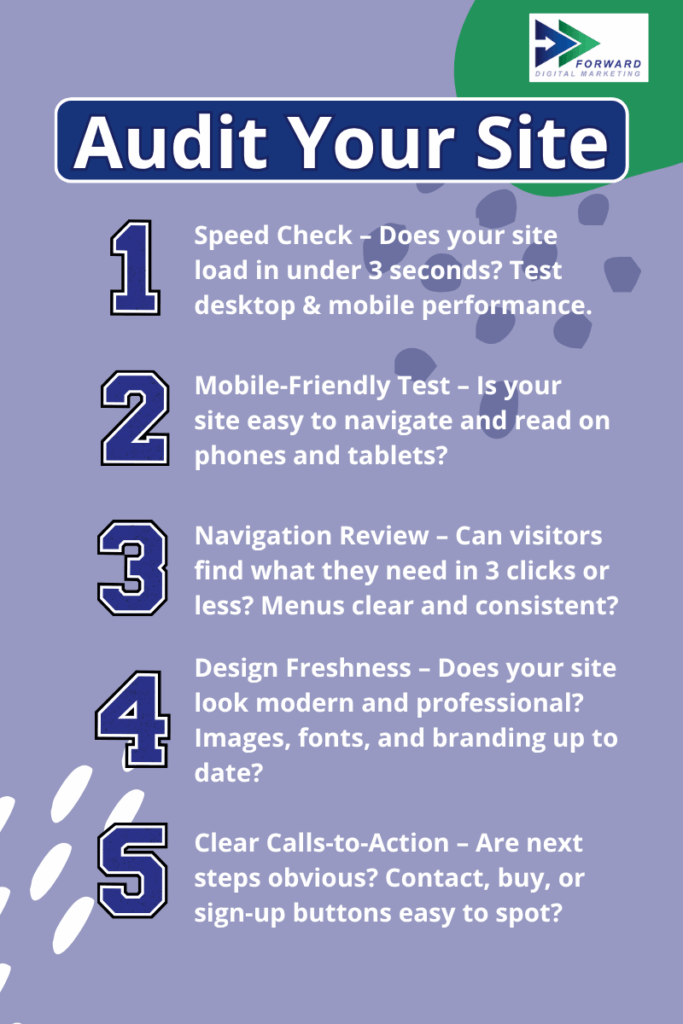
    The holidays are around the corner! While you’re preparing for more customers your website mistakes might be quietly working against you. Yet for a small business, a bad website doesn’t just look unprofessional, it actively drives customers away. It’s important to be able to audit your website with quick confidence, because online shopping is at an all-time high, and customers expect a seamless experience. Read on to learn the top five website mistakes that are costing you money. Plus, learn how to fix them before the busiest season of the year!

    Website speed matters banner with speedometer icon and Forward Digital Marketing branding

    1. Your site takes forever to load

    First, let’s start with the most common website mistakes that turn visitors away before they even see your site: speed and performance. Slow sites lose visitors in seconds and in a world of short attention spans and on-demand service, a delay of even 2–3 seconds can cut your conversion rate in half!


    Website speed, or performance, refers to how quickly a browser can fully load website pages, and poor speed results in poor conversion rates. One study found that decreasing their homepage load time by 100 milliseconds resulted in a 1.11% increase in session-based conversion.  Another, looking at Walmart, discovered that improving page load time by even one second increased their conversions by 2%. An even more impressive improvement happened for one retailer who experienced a 12-13% increase in sales after cutting its page load time in half. A faster site makes customers happier. It also helps you rank higher in Google.

    You can use this great tool to audit your website. The bottom line: speed matters, and optimizing your website is key to optimizing your conversion rates.

    Fix: Invest in reliable hosting and speed optimization.

    2. Your site isn’t mobile-friendly

    Even if your site loads quickly, it won’t matter if visitors can’t use it easily on their phones. More than half of online traffic now comes from mobile: a whopping 62.4%. If your site looks broken or is hard to navigate on a phone, you’re losing sales every day.

    For better or worse, mobile isn’t going anywhere. In 2005, only 6.1% of traffic was from mobile users, but within 10 years it grew to almost 40%. Now, in 2025, mobile traffic makes up the majority of users, and that number will only continue to rise. If your site isn’t mobile friendly, you’re losing easy sales. According to Optinmonster (2022), 77% of consumers purchase impulsively, and 70% of them make purchase decisions on their mobile devices within the first hour of seeing a product. If your website isn’t easy to scroll and navigate, consumers will quickly lose interest before ever completing their purchase with your small business.

    Fix: Update to a responsive design that adapts to any screen size.

    Website navigation banner with compass icon and Forward Digital Marketing branding

    3. Customers can’t find what they need

    Of course, a mobile-friendly design is only part of the picture — customers also need to find what they’re looking for without getting lost. Burying your phone number, address, or menu behind too many clicks creates friction. If a customer struggles, they’ll bounce to a competitor.

    In a recent survey, 50% of internet users were able to predict where relevant content would appear in a standard website navigation structure.. While that might sound positive, if only half of your visitors can find the information they’re looking for, it’s actually a major problem. A disorganized website can lead to higher bounce rates and less time on your site, which ultimately lowers conversion rates.

    Fix: Place contact info and key calls-to-action front and center.

    4. Outdated design signals “out of business”

    Clear navigation helps, but if your site looks like it hasn’t been touched in years, visitors may still click away. Websites that look stuck in 2010 send the wrong message: if you don’t update your website, can customers trust you to keep up with their current needs?

    The U.S. Chamber of Commerce found in a recent study that 55% of a brand’s first impressions are visual. If your website fails to meet that expectation from the start, you’re already losing potential customers. Updating your brand doesn’t have to be expensive, but it does have to be thoughtful. You need to understand your customer base better than anyone else in order to build a site that is visually appealing to your specific audience. Be wary of chasing trends that overhaul your website but ultimately only last for a small duration, leading to even more work.

    To help you audit your website’s visual evolution use The Wayback Machine! If your site hasn’t changed visuals in 5 years, it’s time for a refresh.


    Fix: A modern, clean design builds credibility instantly.

    Clear call-to-action banner with bold button icon and Forward Digital Marketing branding

    5. No clear call-to-action

    Finally, even the best-looking site won’t drive results if you don’t tell visitors what to do next. Your website isn’t just decoration. If you’re not guiding visitors toward booking, calling, or buying, you’re leaving money on the table.

    We can all agree that full-screen pop-ups are extremely annoying, but that’s not the only way to gather leads, close a sale, or drive customers to a specific page. Small pop-up windows in the sidebar, relevant hyperlinks within content, and easy-to-find “Buy Now” buttons show customers they’re expected to take action on your site. Remember: calls to actions (CTAs) allow you to collect valuable information from consumers so you can follow up with educational materials, sales promotions, and updates about your company. There’s no need to chase down consumers when they’re already on your site.

    Fix: Add clear buttons and forms on every page.

    Don’t let your small website mistakes cost you customers. By fixing these five common issues — slow load times, poor mobile design, confusing navigation, outdated visuals, and missing CTAs — you’ll keep visitors engaged, build trust, and convert more sales. Every second matters online, and even one weak spot can send customers to your competitors. Go audit your site today and look for these 5 website mistakes; even one small fix can make a big difference. If you discover gaps, Forward Digital Marketing builds websites designed to convert, so you can focus on running your business while your site does the heavy lifting. Ready to see what your website could do for your business? Contact us today for an expert eye to look over your site!

    Website audit checklist poster highlighting five common website mistakes small businesses make

  • Come On In… Our Expert Team is Excited to Help Your Small Business!

    Come On In… Our Expert Team is Excited to Help Your Small Business!

    Welcome to our new website, our new look, our new approach to helping small businesses define their market and help them increase exposure for their products and services. Whether retail, real estate, services, municipalities, organizations, whatever the small business type, we help small businesses generate more leads, gain new customers, differentiated exposure, etc. with digital marketing.

    What is digital marketing? Digital marketing includes your website, email, social media presence, online listings, Internet reputation management, out of home advertising, and more. It must all be cohesive and work with any traditional marketing that you may be doing.

    As you will read, we have been in business for over 20 years, building websites and offering marketing assistance in various ways. In taking a real good look at our business recently, a business professional asked me if I had thought about changing the name. Change my name? Why would I do that? What a concept… LOL…

    Follow along if you will. We want to offer you some good tips and tricks to help your small business grow. When we find something really good from another source, we won’t keep it to ourselves. We will share with you here. One thing is certain, marketing is technology necessary. So it is always changing. Never hesitate to contact us. If you’d like to talk about your small business marketing, or you have any ideas and suggestions that you would like to share, maybe even success stories, we want to hear about them.

    If you know me, I have been signing off my emails this same way for a couple of years. Thus, the new name… We are now: Forward Digital Marketing.

    Always looking forward,

    Susan.